Volkswagen Polo Service & Repair Manual: Refresh Charging with Battery Charger -VAS5903
| Special tools and workshop equipment
required |
| Battery Charger -VAS5900- |
 WARNING
| Risk of injury. Follow all Warnings and Safety
Precautions. Refer to
→ Chapter „Warnings and Safety Precautions“. |
|
WARNING
| Batteries that have a light yellow visual indicator
do not have to be tested or charged. Jump starting must
not be used! |
| There is a risk of explosion during testing,
charging or jump starting. |
| These batteries must be replaced. |
|
 Caution
| “Refresh charging” is not permitted for VW vehicles,
because voltage surges can damage the on-board
electronics. |
| If “Refresh charging” is still used, the battery
must always be separated from the vehicle electrical
system. |
|
Caution
| During the charging process, always set the
operation mode corresponding with the battery. Refer to
the Battery Charger -VAS5903- Operating Instructions! |
| “Refresh charging” is suitable for |
| Wet batteries, which can be filled with distilled
water. |
| Do not use “Refresh charging” on maintenance-free
wet batteries. |
|
| “Refresh charging (Refr)” mode is only used on batteries
that are possibly defective (for example, sulfation). The
battery is then charged to the maximum specific gravity of the
electrolyte and the plates are reactivated (removal of sulfation
layer). |
 Note Note
| The battery temperature must be at least 10 °C (50 °F). |
| – |
Turn off the ignition and all electrical consumers. |
| – |
Plug in the electrical system connector of the charger. The
last selected mode is shown on the display. Refer to
→ Chapter „Battery Charger -VAS5903- Device Description“. |
|
|
|
| – |
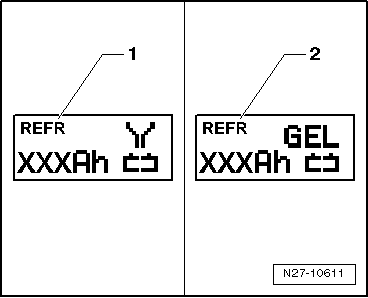
Select battery type using INFO. |
| The symbol -1- for “refresh -
charging wet batteries” or the symbol -2-
for “refresh - charging of Gel/Absorbant Glass Mat (AGM)
batteries” is indicated in the display. |
| – |
Set the capacity (Ah) of the battery to be charged with the
corresponding button “Up”↑ or “Down”↓. |
| – |
Clamp the red charging clamp “+” to the positive battery
terminal. |
Note
| In the case of vehicles with a start/stop function and an
installed Battery Monitoring Control Module -J367-, the black
charging clamp (-) must be connected to the body ground. The
start/stop system will malfunction if it is connected to the
negative terminal on the battery. |
| – |
Connect the black charging clamp “-” to the negative battery
terminal. |
| The battery charger recognizes the nominal voltage of the
connected battery (6 V, 12 V or 24 V) and begins the charging
process automatically. |
|
|
|
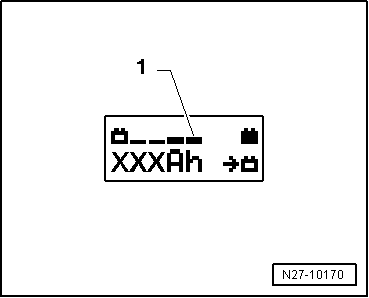
| At a charge condition of approximately 80 - 85% of the
battery voltage, charging unit begins the “Final-charging”. The
fourth bar is indicated on the display -1-.
The battery is now ready to be used. |
Note
| A successful “Refresh charge” depends on the degree of
sulfation on the battery. |
| Possible malfunctions and how they are handled: |
| 1 - |
Displayed voltage does not match the nominal voltage: |
| – |
Hold the appropriate button “Up”↑
or “Down”↓ until the charging process
begins. |
| 2 - |
Displayed battery voltage does not match rated voltage -
charging process has already begun: |
| – |
Press START/STOP twice. |
| – |
Hold the appropriate button “Up”↑
or “Down”↓ until the charging process
begins. |
| 3 - |
The charger does not recognize a battery, when the battery
voltage is less than 2 V: |
| The display remains unchanged. |
| The set operating mode and Ampere-hours (Ah) are displayed. |
| End Battery Charging Process |
| – |
Remove the black charging clamp “-” of the charger from the
negative battery terminal. |
| – |
Remove the red charging clamp “+” of the charger from the
positive battery terminal. |
| – |
Pull out the electrical system connector of the charger. |
|
|
|
Special tools and workshop equipment
required
Battery Charger -VAS5903-
WARNING
...
Special tools and workshop equipment
required
Battery Charger -VAS5903-
WARNING
...
Other materials:
Gear-change indicator
First read and observe the introductory information
and safety warnings In some vehicles, the instrument cluster
will show which gear should be selected while the vehicle is in motion to reduce
fuel consumption.
Display
Meaning
The c ...
Siemens Wheel Electronics Tire Pressure Monitoring Sensor, Removing and
Installing
WARNING
If tire sealant was used, then the wheel electronics
on that particular wheel must be replaced.
The Siemens wheel electronics does not have a
microencapsulated ...
Driving
a loaded vehicle
First read and observe the introductory information
and safety warnings
For good vehicle handling when driving a loaded vehicle, please observe the following:
Stow all items of luggage securely .
Accelerate carefully and gently.
Avoid sudden braking and driving manoeuvres.
...
© 2016-2026 Copyright www.vwpolo.net


 Battery, Charging with Battery Charger -VAS5903
 Severely Discharged Battery, Charging with Battery Charger -VAS5903