VW Polo manuals

Volkswagen Polo Service & Repair Manual: Battery, Charging with Battery Charger -VAS5906

  WARNING
Risk of injury. Follow all Warnings and Safety Precautions. Refer to → Chapter „Warnings and Safety Precautions“.
  WARNING
Batteries that have a light yellow visual indicator do not have to be tested or charged. Jump starting must not be used!
There is a risk of explosion during testing, charging or jump starting.
These batteries must be replaced.
   
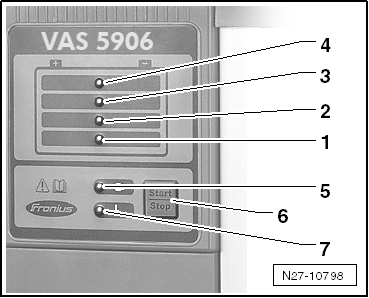
Control Panel Overview
1 -  25% charge display.
2 -  50% charge display.
3 -  75% charge display.
4 -  100% charge display.
5 -  Ready-to-use display
6 -  Pushing the start/stop and setup buttons will stop and start the charging process. Enter into the setup menu and select characteristic line type (hold for 10 seconds)
7 -  Display malfunction
–  Position the battery charger inside the engine compartment or under the vehicle.
–  Connect the network cable to the battery charger and then connect it to the network.
When the battery charger is in idle - the ready-to-use lights up.
  WARNING
Risk of injury. Follow all Warnings and Safety Precautions. Refer to → Chapter „Warnings and Safety Precautions“.
–  Turn off the ignition.
–  Connect the red charger cable to the positive terminal “+” on the battery.
  Note
In the case of vehicles with a start/stop function and an installed Battery Monitoring Control Module -J367-, the black charging clamp (-) must be connected to the body ground. The start/stop system will malfunction if it is connected to the negative terminal on the battery.
–  Connect the black charge cable to the negative terminal “-” on the battery.
Charging will begin after approximately 2 seconds.
LEDs show the battery charge level. When all the lamps illuminate, the battery is charged.
When the battery is completely charged, the Battery Charger -VAS5906- automatically switches to maintenance charging.
  Caution
Sparks can result if the charging terminals are removed too early. Press the stop/start button to end the charging process.
–  Press the start/stop button to end the charging.
–  Disconnect the black charging cable from the negative terminal “-” on the battery.
–  Disconnect the red charging cable from the positive terminal “+” on the battery.
 

Battery, Charging with Battery Charger -VAS5906

General Information
Battery Charger -VAS5906-   WARNING Risk of injury. Follow all Warnings and Safety Precautions. Refer ...

Battery Tester Charger Kit -GRX3000VAS
...

Other materials:

Wheel cover
Fig. 163 Removing press-on wheel covers Fig. 164 Removing bolted-on wheel covers First read and observe the introductory information and safety warnings Removing and fitting press-on wheel covers Take the box spanner and wire hook from the toolkit . Insert the wire hook into o ...

Two-Part MS Matte Clear Coat
Definition: Two-Part MS Matt Clear Coat -L2K 769 020 A2- Edition 08/2013 Product Description Two-part MS matt clear coat is a clear coat from the two-part acrylic system. ...

Valve, Removing and Installing, Rubber Valve
Make sure wheel rim is clean.     –  Using the Valve Fitting Tool Valve Fitting Tool -VAS6459--1-, insert a new tire valve. –  Remove the valve insert. ...

© 2016-2025 Copyright www.vwpolo.net