
Volkswagen Polo Owners Manual: Replacing the battery
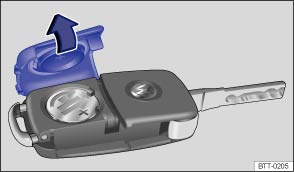
Fig. 21 Vehicle key: opening the battery case cover
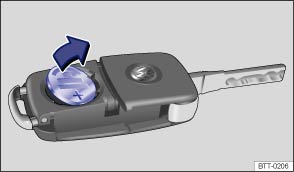
Fig. 22 Vehicle key: removing the battery
 First read and observe the introductory information
and safety warnings
Volkswagen recommends having the battery changed at a Volkswagen dealership or by a qualified workshop.
The battery is located on the rear side of the vehicle key underneath a cover.
Changing the battery
- Fold out the key bit of the vehicle key .
- Pull up the cover on the rear side of the vehicle key in the direction of the arrow .
- Using a suitable thin object, lever the battery out of the battery compartment .
- Insert the new battery as shown and push it into the battery compartment against the direction of the arrow .
- Fit the cover as shown and push it onto the vehicle key housing against the direction shown by the arrow until it engages.

 NOTICE
- The vehicle key can be damaged if the battery is not changed properly.
- Unsuitable batteries can damage the vehicle key. Replace a discharged battery only with a new battery of the same voltage rating, size and specification.
- Ensure that the battery is fitted the right way round.

Dispose of discharged batteries in accordance with regulations governing the protection of the environment.
The battery in the vehicle key may contain perchlorate. Please comply with any legal requirements and regulations when handling and disposing of these batteries.
 Indicator lamp in the vehicle key
Fig. 20 Indicator lamp in the vehicle
key
First read and observe the introductory information
and safety warnings
If a button on the vehicle key is pressed briefly, the indicator lamp (arrow)
...
 Synchronising the vehicle key
First read and observe the introductory information
and safety warnings
It may no longer be possible to lock or unlock the vehicle with the remote control
if the button is pressed
...
Other materials:
AGM Battery, Checking
Perform Battery Checks in the Following Sequence:
1.
Visual inspection. Refer to
→ Chapter „Visual Inspection“.
2.
Check the battery using the Battery Tester -VAS6161-. Refer
to
...
Changing a wheel
Fig. 170 Changing the wheel:
removing the wheel bolts with the screwdriver handle
First read and observe the introductory
information and safety warnings
Removing the wheel
Read the checklist .
Loosen the wheel bolts .
Jack up the vehicle .
Using the hexagonal socket ...
Plastic Cleaner
Definition:
Plastic Cleaner -D 195 850 A1-
Edition 04/2009
Product Description
Plastic Cleaner -D 195 850 A1- is a liquid universal cleaner
and thinner with an non-aromatic, ...
