
Volkswagen Polo Owners Manual: Operating ParkPilot
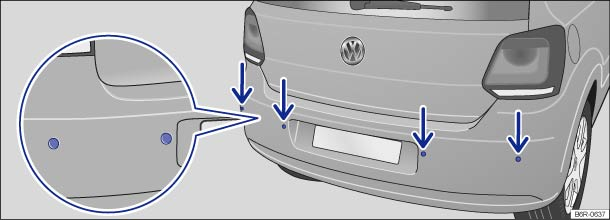
Fig. 120 In the rear bumper: ParkPilot ultrasound sensors
 First read and observe the introductory information
and safety warnings
First read and observe the introductory information
and safety warnings The ParkPilot uses ultraound sensors to determine the distance between the rear bumper and an obstacle. There are 4 ultrasound sensors in the rear bumper (arrows).
Switching ParkPilot on and off
| Function | What to do when the ignition is switched on |
|---|---|
| Switching on the ParkPilot automatically. | Select reverse gear or move the selector lever to position R. |
| Switching the display off manually. | Press a function selection button on the factory-fitted radio or navigation system. |
OR: touch the
 function button on
the screen. function button on
the screen. |
|
| Switching off the ParkPilot automatically. | Approximately 10 seconds after shifting out of reverse gear, or selector lever position R, with an active ParkPilot screen display or . |
| OR: immediately after shifting out of reverse gear, or selector lever position R, with an inactive ParkPilot screen display or . | |
| OR: accelerate forwards faster than approximately 10 – 15 km/h (6 – 9 mph) with active ParkPilot screen display or . |
Special features of ParkPilot
- In some cases, the ParkPilot registers water and ice on the ultrasound sensors as an obstacle.
- The acoustic signal will become quieter after a few seconds if the distance remains the same. The volume will remain constant if the signal tone is continuous.
- As soon as the vehicle moves away from an obstacle again, the intermittent signal tone switches off automatically. If the vehicle approaches the obstacle again, the acoustic warning is switched on automatically.
- The ParkPilot cannot be switched on if the factory-fitted towing bracket is electrically connected to the trailer.
- No acoustic signal is given in vehicles with an automatic gearbox if the selector lever is in position P.
- A Volkswagen dealership can adjust the volume of the acoustic signals.

If there is a function fault in the ParkPilot, an acoustic warning is emitted for approximately 3 seconds when switched on for the first time. The ParkPilot should be checked by a qualified workshop immediately.
 Introduction
This chapter contains information on the following subjects:
→ Operating ParkPilot
→ Acoustic and optical ParkPilot signals at the rear of the vehicle
The ParkPilot assists th ...
 Acoustic and optical ParkPilot signals at the rear of the vehicle
Fig. 121 ParkPilot screen display (colour)
Fig. 122 ParkPilot screen display (monochrome)
First read and observe the introductory information
and safety warnings
...
Other materials:
Settings menu
First read and observe the introductory
information and safety warnings
Settings menu
Function
Language
Setting the language for the display texts and messages in the
navigation system.
MFD data
Settings for which MFD data should ap ...
Introduction
This chapter contains information on the following subjects:
→ Handling wheels and tyres
→ Rims
→ New wheels and tyres
→ Tyre pressure
→ Tread depth and wear indicators
→ Tyre damage
→ Spare wheel or temporary spare wheel
â ...
Cleaning and changing windscreen wiper blades
Fig. 142 Variants A and B: Changing the
windscreen wiper blades. Variants B and C: Changing the rear window wiper blade
First read and observe the introductory information
and safety warningsThe factory-fitted windscreen/window wiper blades are
coated with graphite. The graphite coating ens ...
