Volkswagen Polo Service & Repair Manual: Battery, Charging with Battery Charger -VAS5900-
| Special tools and workshop equipment
required |
| Battery Charger -VAS5900- |
 WARNING
| Risk of injury. Follow all Warnings and Safety
Precautions. Refer to
→ Chapter „Warnings and Safety Precautions“. |
|
WARNING
| Batteries that have a light yellow visual indicator
do not have to be tested or charged. Jump starting must
not be used! |
| There is a risk of explosion during testing,
charging or jump starting. |
| These batteries must be replaced. |
|
 Note Note
| The battery temperature must be at least 10 °C (50 °F). |
| – |
Turn off the ignition and all electrical consumers. |
| – |
Plug in the electrical system connector of the charger. The
last selected battery type is shown on the display. |
|
|
|
| – |
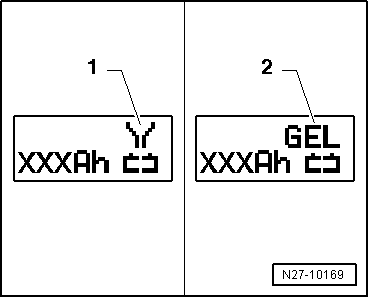
Select battery type using INFO. |
| The symbol -1- for “standard
charge of wet batteries” or the symbol -2-
for “standard charge of Gel/Absorbant Glass Mat (AGM) batteries”
is indicated in the display. |
| – |
Set the capacity (Ah) of the battery to be charged with the
corresponding button “Up”↑ or “Down”↓. |
| – |
Clamp the red charging clamp “+” to the positive battery
terminal. |
Note
| In the case of vehicles with a start/stop function and an
installed Battery Monitoring Control Module -J367-, the black
charging clamp (-) must be connected to the body ground. The
start/stop system will malfunction if it is connected to the
negative terminal on the battery. |
| – |
Connect the black charging clamp “-” to the negative battery
terminal. |
| The battery charger recognizes the nominal voltage of the
connected battery (6 V, 12 V or 24 V) and begins the charging
process automatically. |
|
|
|
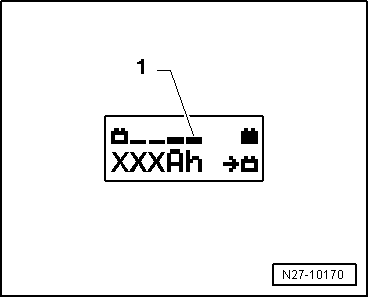
| At a charge condition of approximately 80 - 85%, charging
unit begins the “Final-charging”. The fourth bar is indicated on
the display -1-. The battery is now
ready to be used. |
|
|
|
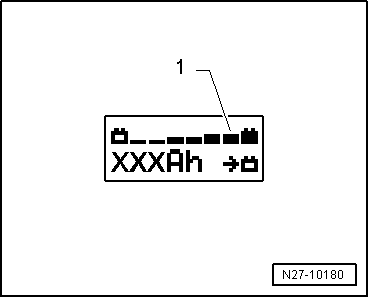
| With a charge status of 100%, all bars are indicated on the
display. |
Note
| With the battery type “standard charge”, parallel operation
of consumers during the charging process is possible. The
charging time is lengthened by this. |
| Depending on battery type, the charger switches over to
sustain charging after approximately 1-7 hours. To achieve a
100% charge status, the battery should remain connected to the
charger for that long. |
| Possible malfunctions and how they are handled: |
| 1 - |
Displayed voltage does not match the nominal voltage: |
| – |
Hold the appropriate button “Up”↑
or “Down”↓ until the charging process
begins. |
| 2 - |
Displayed battery voltage does not match the nominal voltage
- the charging process has already begun: |
| – |
Press START/STOP twice. |
| – |
Hold the appropriate button “Up”↑
or “Down”↓ until the charging process
begins again. |
| 3 - |
The charger does not recognize a battery, when the battery
voltage is less than 2 V: |
| The display remains unchanged. |
| The selected battery type and Ampere hours (Ah) are
displayed. |
| End Battery Charging Process |
| – |
Remove the black charging clamp “-” of the charger from the
negative battery terminal. |
| – |
Remove the red charging clamp “+” of the charger from the
positive battery terminal. |
| – |
Pull out the electrical system connector of the charger. |
|
|
|
WARNING
Risk of injury. Follow all Warnings and Safety
Precautions. Refer to
→ Chapter „Warnings and ...
Special tools and workshop equipment
required
Battery Charger -VAS5900-
WARNING
...
Other materials:
Loading the load carrier system
First read and observe the introductory information
and safety warnings
Loads can be attached securely only when the mounts, roof bars and load carrier
system are fitted correctly .
Maximum permissible roof load
The maximum permitted roof load is 75 kg. The roof load limit
refers to the c ...
Battery with Visual Indicator, Checking
WARNING
Risk of injury. Follow all Warnings and Safety
Precautions. Refer to
→ Chapter „Warnings and Safety Precautions“.
Perform Battery Checks in the Follo ...
Contact Housings, Repairing Wire Terminals
Note
For technical reasons, the contact housing for the wire
terminals can be supplied only with the contacts pushed in.
These contacts can be removed at every other contact housing ...
© 2016-2026 Copyright www.vwpolo.net


 Battery Charger -VAS5900- Device Description
 Service Charging with Battery Charger -VAS5900