
Volkswagen Polo Owners Manual: Upper section of the centre console
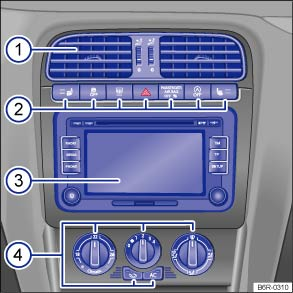
Fig. 7 Overview of the upper section of the centre console
Key for :
 Vent
Vent
 ,
,


Button for:
- Seat heating for the left and right

- Traction control system (TCS)

- Rear window heating

- Hazard warning lights

- Indicator lamp for the front passenger front airbag switch-off function
- Start/stop system

- Button for switching to autogas mode


- Seat heating for the left and right
 Radio or navigation system
(factory-fitted) ⇒ BookletRadio, or ⇒ BookletNavigation system,
Radio or navigation system
(factory-fitted) ⇒ BookletRadio, or ⇒ BookletNavigation system, 
Controls for:
- Heating and fresh air system
- Air conditioning system (manual)
- Climatronic

 Lower section of the centre console
Fig. 8 Overview of the lower section of
the centre console
Key for :
Lever for:
Manual gearbox
Automatic gearbox
Stowage compartment in the front centre
console ...
Other materials:
Refrigerant Oil
Refrigerant oil mixes with the refrigerant (about 20 - 40%,
depending on compressor type and amount of refrigerant) and
circulates constantly in the system, lubricating the moving
parts.
Special synthetic refrigerant oils, for example,
...
Gear-change indicator
First read and observe the introductory information
and safety warnings In some vehicles, the instrument cluster
will show which gear should be selected while the vehicle is in motion to reduce
fuel consumption.
Display
Meaning
The c ...
Tyre lettering
Fig. 149 International tyre lettering
First read and observe the introductory information
and safety warnings
Tyre lettering (example)
Meaning
①
Product name
Individual tyre lettering from manufacturer.
②
DO ...
