Volkswagen Polo Service & Repair Manual: Solar Battery Maintainer -VAS6102A
Solar Battery Maintainer -VAS6102A- Maintenance Charging
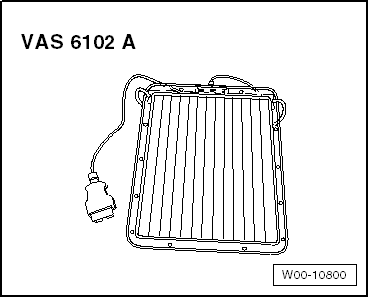
| Solar Battery Maintainer -VAS6102A- |
| The Solar Battery Maintainer -VAS6102A- supports the vehicle
electrical system and prevents the battery from
self-discharging. |
| The Solar Battery Maintainer -VAS6102A- reaches a maximum
voltage of 14.3 V and a maximum charge current of 255 mA. |
| All chargeable lead- or lead gel batteries can be charged
with the Solar Battery Maintainer -VAS6102A-. |
| The Solar Battery Maintainer -VAS6102A- is connected to the
diagnostic connection in the vehicle. |
| There is a green LED inside the frame, which displays the
function. The brighter the LED, the higher the charging current. |
| It is not possible to overcharge the battery due to the
integrated electronics. |
|
|
|
| – |
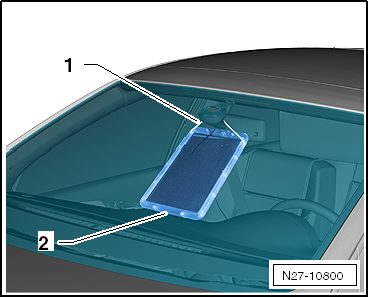
Secure the Solar Battery Maintainer -VAS6102A- to the
interior rearview mirror -1-. |
| – |
Lay the bottom on the instrument panel
-2-. |
 Note Note
| The Solar Battery Maintainer -VAS6102A- must not touch the
instrument panel completely. Only the bottom edge may be used
for support. If it touches completely, the color of the
instrument panel could change. |
| – |
Pull the securing string together so that the Solar Battery
Maintainer -VAS6102A- is close to the glass. |
| – |
Connect the Solar Battery Maintainer -VAS6102A- to the
vehicle diagnostic connection. Connecting is the same as with
the Vehicle Diagnostic Tester. Refer to
→ Chapter „Vehicle Diagnostic Tester, Connecting“. |
| – |
Check the Solar Battery Maintainer -VAS6102A- function. The
green LED shows the functionality of the Solar Battery
Maintainer -VAS6102A-. |
|
|
|
Sometimes the display shows the malfunction or the messages
based on the condition.
The following is a list of the most frequent displayed
mess ...
WARNING
Risk of injury. Follow all Warnings and Safety
Precautions. Refer to
→ Chapter „Warnings and ...
© 2016-2026 Copyright www.vwpolo.net


 Battery Tester Charger Kit -GRX3000VAS- Troubleshooting
 Severely Discharged Batteries