Volkswagen Polo Service & Repair Manual: Service Charging with Battery Charger -VAS5900
| Special tools and workshop equipment
required |
| Battery Charger -VAS5900- |
 WARNING
| Risk of injury. Follow all Warnings and Safety
Precautions. Refer to
→ Chapter „Warnings and Safety Precautions“. |
|
 Caution
| “Service charging” is not permitted for VW vehicles,
because voltage surges can damage the on-board
electronics. |
| If “Service charging” is still used, the battery
must always be separated from the vehicle electrical
system. |
|
WARNING
| Batteries that have a light yellow visual indicator
do not have to be tested or charged. Jump starting must
not be used! |
| There is a risk of explosion during testing,
charging or jump starting. |
| These batteries must be replaced. |
|
Caution
| During the charging process, always set the
operation mode corresponding with the battery. Refer to
the Battery Charger -VAS5900- Operating Instructions! |
| “Service Charging” is suitable for |
| Wet batteries having a visual indicator which allows
charging (visual indicator black or green). |
|
| The “Service charge (SERV)” mode is only used with sulfated
batteries. The battery with voltages > 14.4 V is charged. A
partial removal of the sulfation layer can result from this.
Check the visual indicator after charging, immediately before
the battery is used. Refer to
→ Chapter „Visual Display in Battery Cover, Checking“. |
 Note Note
| The battery temperature must be at least 10 °C (50 °F). |
| – |
Turn off the ignition and all electrical consumers. |
| – |
Plug in the electrical system connector of the charger. The
last selected mode is shown on the display. Refer to
→ Chapter „Battery Charger -VAS5900- Device Description“. |
|
|
|
| – |
Select battery type using INFO. |
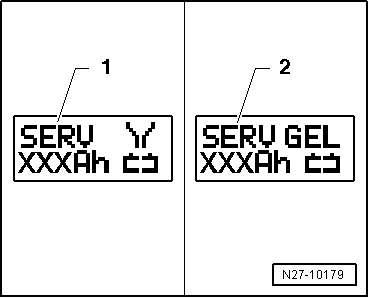
| The symbol -1- for “service
charge of wet batteries” or the symbol -2-
for “service charge of Gel/Absorbant Glass Mat (AGM) batteries”
is indicated in the display. |
| – |
Set the capacity (Ah) of the battery to be charged with the
corresponding button “Up”↑ or “Down”↓. |
| – |
Clamp the red charging clamp “+” to the positive battery
terminal. |
Note
| In the case of vehicles with a start/stop function and an
installed Battery Monitoring Control Module -J367-, the black
charging clamp “-” must be connected to the body ground. The
start/stop system will malfunction if it is connected to the
negative terminal on the battery. |
| – |
Connect the black charging clamp “-” to the negative battery
terminal. |
| The battery charger recognizes the nominal voltage of the
connected battery (6 V, 12 V or 24 V) and begins the charging
process automatically. |
|
|
|
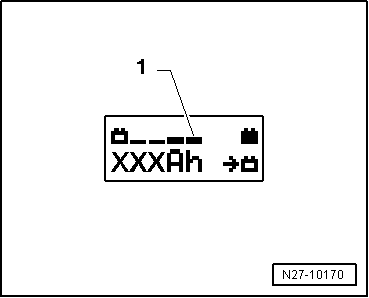
| At a charge condition of approximately 80 - 85% of the
battery voltage, charging unit begins the “Final-charging”. The
fourth bar is indicated on the display -1-.
The battery is now ready to be used. |
Note
| A successful “service charge” depends on the degree of
sulfation on the battery. |
| Possible malfunctions and how they are handled: |
| 1 - |
Displayed voltage does not match the nominal voltage: |
| – |
Hold the appropriate button “Up”↑
or “Down”↓ until the charging process
begins. |
| 2 - |
Displayed battery voltage does not match the nominal voltage
- the charging process has already begun: |
| – |
Press START/STOP twice. |
| – |
Hold the appropriate button “Up”↑
or “Down”↓ until the charging process
begins. |
| 3 - |
The charger does not recognize a battery, when the battery
voltage is less than 2 V: |
| The display remains unchanged. |
| The set operating mode and Ampere-hours (Ah) are displayed. |
| End Battery Charging Process |
| – |
Remove the black charging clamp “-” of the charger from the
negative battery terminal. |
| – |
Remove the red charging clamp “+” of the charger from the
positive battery terminal. |
| – |
Pull out the electrical system connector of the charger. |
|
|
|
Special tools and workshop equipment
required
Battery Charger -VAS5900-
WARNING
...
Special tools and workshop equipment
required
Battery Charger -VAS5900-
WARNING
...
Other materials:
Possible Concerns
Note
The A/C system is functioning correctly when the air flowing
from the instrument panel vents has a temperature of 70C
or lower.
Setting on Climatronic “LO”.
Setting on A/C system ...
Matting Component -LVM 769 810 A2
Definition:
Matting Component -LVM 769 810 A2-
Edition 10/2014
Product Description
With two-part HS clear coats and two-part HS top coat, the
Matting Component - LVM 769 810 ...
Fuses in the vehicle
Fig. 172 Dash panel on the driver
side: fuse box cover
Fig. 173 In the front left of the
engine compartment: fuse box cover
First read and observe the introductory
information and safety warnings
Fuses must always be replaced by a new fuse with the same amp rating (same
colour and marki ...
© 2016-2026 Copyright www.vwpolo.net


 Battery, Charging with Battery Charger -VAS5900-
 Severely Discharged Batteries, Charging with Battery Charger -VAS5900