
Volkswagen Polo Owners Manual: Side view
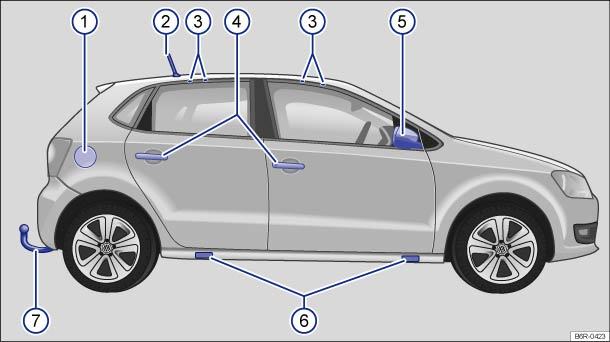
Fig. 1 Overview of the right side of the vehicle Positions ③, ④, ⑤ and ⑤ are also at the same position on the left side of the vehicle.
Key for :
 Tank flap
  Roof aerial
  Attachment points for the mounts and
roof carrier
Attachment points for the mounts and
roof carrier  Door release lever
  Exterior mirrors
  Jacking points
  Towing bracket
 Vehicle exterior
...
 Front view
Fig. 2 Overview of the front of the
vehicle
Key for :
Rain/light sensor on the mirror base
Windscreen
Windscreen wiper
Bonnet
Bonnet release lever
Headlights
Headlight wa ...
Other materials:
Tire Sealant, Disposal
Tire sealant or residue from it must not be mixed with other
wastes/fluids
Accumulating fluid residue from tire sealant must be
collected and placed in a plastic container. The plastic
containers can be sent for recycling together ...
Changing bulbs in the front bumper
Fig. 182 In the front bumper,
right-hand side: removing the cover and headlight
Fig. 183 In the front bumper,
right-hand side: removing the cover and headlight
First read and observe the introductory
information and safety warnings
The actions should onl ...
Introduction
This chapter contains information on the following subjects:
→ Seat heating
Additional information and warnings:
Adjusting the seat position
Seat belts
Airbag system
Child seats (accessories)
Exterior mirrors
Luggage compartment
WARNING
Incorrec ...
